Today I got a feature request asking if it would be possible to export flvs without sound. So here it is:
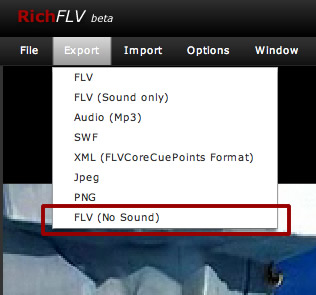
This will just export your flv and remove all available sound tags.
Get the latest RichFLV here.
Today I got a feature request asking if it would be possible to export flvs without sound. So here it is:
This will just export your flv and remove all available sound tags.
Get the latest RichFLV here.

Are you planning to add drag and drop to open and play videos? That would be a huge bonus to this app!

From editing FLV files, I noticed that you can’t pick an arbitrary point to crop. It looks like there’s an existing keyframe and you have to use that as your start or end point. Is that a limitation of FLV, and there’s nothing that can be done about that or is it possible to somehow insert keyframes or otherwise just crop at arbitrary points?
Thanks.
ps. I will check this post for your response.

Hi Silicon,
Yes you`re right. It`s only possible to cut flv files at keyframe positions. So the start point needs to be a keyframe.
In theory it`s possible to cut at any frame but the playback would only start at a keyframe.
Benz
Thanks, Benz.
And it’s not possible to insert keyframes, is it?
No it`s not possible. This would mean to reencode the frames and this would be very complex and difficult because the codecs are not open and free.
Benz

Thank you for a very nice little program! However i am having a problem… When I try to load large flv files the program hangs. When I load a 1.0 GB file it hangs at 49%, and when i open a 624MB file it hangs at 81% with the CPU running at ~75% Both files are created using Adobe Flash Media Encoder 2.5
The problem seems to be memory-related in some way, because in both cases when the program hangs it is using 563MB of memory. I am running RichFLV on a Vista 32-bit system with 4 GB of ram, so memory should not really be a problem…
p.s. Is there any way of downloading older versions of RichFLV?
Thanks,
Staffan
Hey Staffan,
the current version of RichFLV has indeed a problem with big files. Originally it was thought to handle only small webclips max 150 mb. As I get so many requests I`m currently developing a new version and a first alpha should be ready soon. This will allow you to edit very large files. Could you please tell me what you need to do with it?
I need to rewrite the whole thing and want to focus on the most important stuff. For now I have cutting, stitching and Metadata implemented.
Thanks
Benz
Hi Benjamin!
Thank you for your quick reply! The files are from live streaming of a soccer game, and i need to cut away the beginning and ending to make it suitable for on demand viewing.
The main features I’m interested in is cutting, stitching and then exporting the finished project as a flv with sound and everything. I will probably not be using it with larger files than ~1,5GB. If this was working it would really help me since this is the only program i have found out there that can edit an flv without reencoding, and losing quality.
Thanks
/Staffan

ok, I give up, where can I download richFLV?
Mike
@Mike: At the applications page http://www.richapps.de/?page_id=120
Make sure you have AIR installed first.
Benz

Thanks for the wonderful app. But I encountered some problem with the keyframe. I was trying to crop the flv using keyframe and setting the inpoint and outpoint before i export it to flv file. I can only export successfully if the inpoint is set to 0. Other keyframe value for inpoint will not export successfully. Please help.

Great app! Thank you so much!

Don’t u have any documentary how to use the tool?. I couldn’t figure out how to edit my flv videos.thanks

Having problems installing RichFLV…everytime I try to install I get the blue screen then computer restarts…
I’ve tried with Air 1.0 as well as with Air 1.5…any suggestions…

if richflv have a ‘Add tittle’ that will be great

The application hangs whenever i save any file. Anyone else having this issue?

@Allen : 10 November 2008 at 9:10 am …
…did you ever figure out the keyframes inpoint at zero problem?
I’m having the same experience.
Mike

I am trying to delete the first 5 minutes of a FLV file. Can someone please list the steps I need to take using RichFLV to edit?
Thanks
[…] cc-Player und JW Player empfehlen die Software: Captionate, der Flowplayer wie MALT Wiki Player RichFLV.? Und auch hierbei gibt es wieder graduelle Unterschiede. RichFLV ist so gut wie nicht […]

What about the ability to crop FLVs? I can’t find any decent software for it. There’s a lot of widescreen videos that are fit into a 4:3 FLV. I want to crop it so I don’t get side boxes when I do full screen when playing the video. RichFLV is the best FLV editor I’ve found.

i like the simplicity of this program, butt..it’s useless..impossible to crop from start position..just from the end..or am i nincompoop?
Leave a Reply